Get started with the Marty Controller in the current Robotical app. Use buttons and a joystick to move your Marty V2, or build a short routine with the Sequencer.
What is the Marty Controller?
The Marty Controller is a way to explore robot movement before you start using programming blocks. It has two modes:
- Controller: movement buttons and the joystick send commands to Marty as you use them.
- Sequencer: movement buttons add commands to a track. Marty performs the queued commands when you choose the green flag.
A physical Marty must be connected to use the Controller in the Robotical app.
How do I access the Controller?
- Open the Robotical web app, or open the Robotical app on your phone or tablet.
- Turn on Marty and keep it near your computer or tablet.
- Choose Connect Marty, the blue Marty face in the main app's navigation, and follow the connection prompt.
- Select your Marty when prompted and wait for the connection to complete.
- From Home, choose Marty Controller.
If you choose Marty Controller before connecting a robot, the app asks you to connect Marty first. For a Bluetooth connection in the web app, use a browser that supports Bluetooth access. You can also use the current mobile app:
Place Marty on a clear, level surface with enough room to move before trying the controls.
What will I see in the Controller?
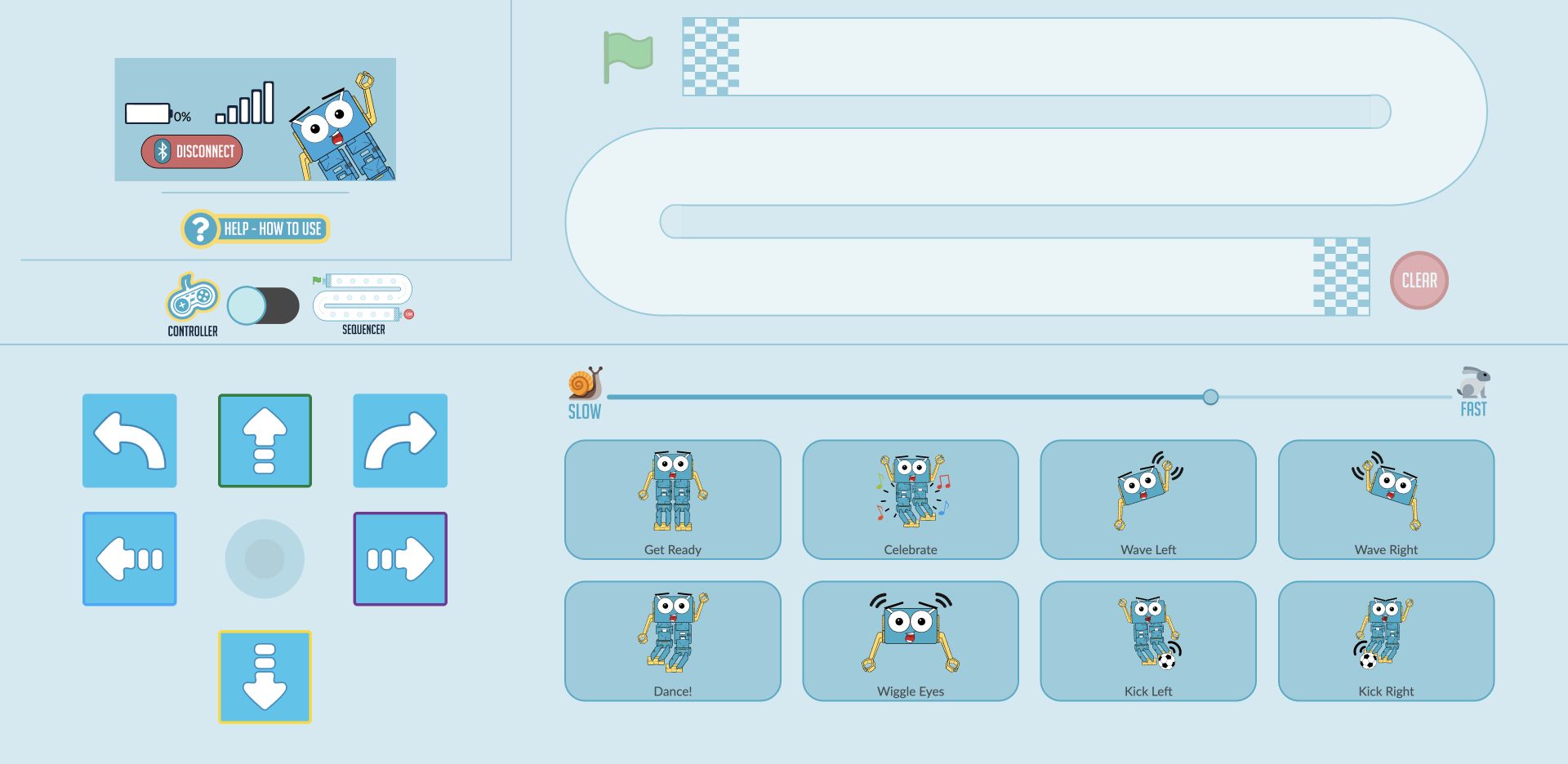
- Connection panel: shows Marty's name, battery and signal information, with a Disconnect control. The values depend on your connected robot.
- Controller / Sequencer switch: changes between direct control and building a sequence. Switching modes clears the queued sequence.
- Race track: contains sequence steps when Sequencer is selected. Its green flag and Clear controls are inactive in Controller mode.
- Directional controls: the arrows and central joystick control walking, sliding and turning.
- Action buttons: choose a named movement such as Get Ready, Wave Right or Celebrate.
- Speed slider: the snail is Slow and the rabbit is Fast.
Directional arrows and joystick
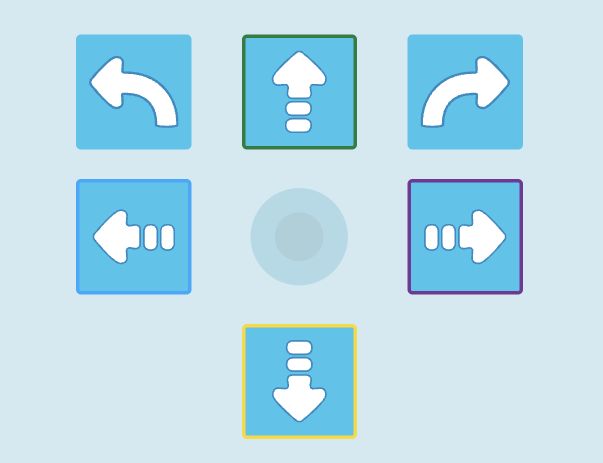
In Controller mode:
- The green-bordered up arrow sends one forward step.
- The yellow-bordered down arrow sends one backward step.
- The blue-bordered left arrow slides Marty left.
- The purple-bordered right arrow slides Marty right.
- The two curved arrows at the top turn Marty left or right.
Left and right refer to Marty's own left and right. The four coloured borders match the corresponding directions in Marty Unplugged.
Drag the joystick's central dot up or down to walk forwards or backwards. Drag it sideways to turn, or diagonally to combine walking and turning. How far you drag it from the centre affects the step or turn amount. Release it to stop sending joystick commands; a movement already sent may still finish.
In Sequencer mode, the joystick is hidden and the arrow buttons add commands to the track instead of moving Marty immediately.
Action buttons
The current Controller has eight action buttons:
- Get Ready: put Marty into its ready stance.
- Celebrate: run a celebration routine.
- Wave Left and Wave Right: wave the selected arm.
- Dance!: run a dance movement.
- Wiggle Eyes: move Marty's eyes.
- Kick Left and Kick Right: kick with the selected leg.
In Controller mode, selecting one sends the command to Marty. In Sequencer mode, it adds one command to the track.
Set the speed

Move the slider towards Slow for slower movement, or towards Fast for faster movement. Start slowly while you get used to the controls. Some routines have their own timing, so not every action responds to the slider in the same way.
When building a sequence, set the speed before adding each command. That command keeps the speed chosen when it was added. Moving the slider later sets the speed for new commands; it does not change the commands already on the track. Slow and fast steps show snail or rabbit markers.
The Sequencer
Use the mode switch to select Sequencer. The joystick disappears and 15 spaces appear on the race track.
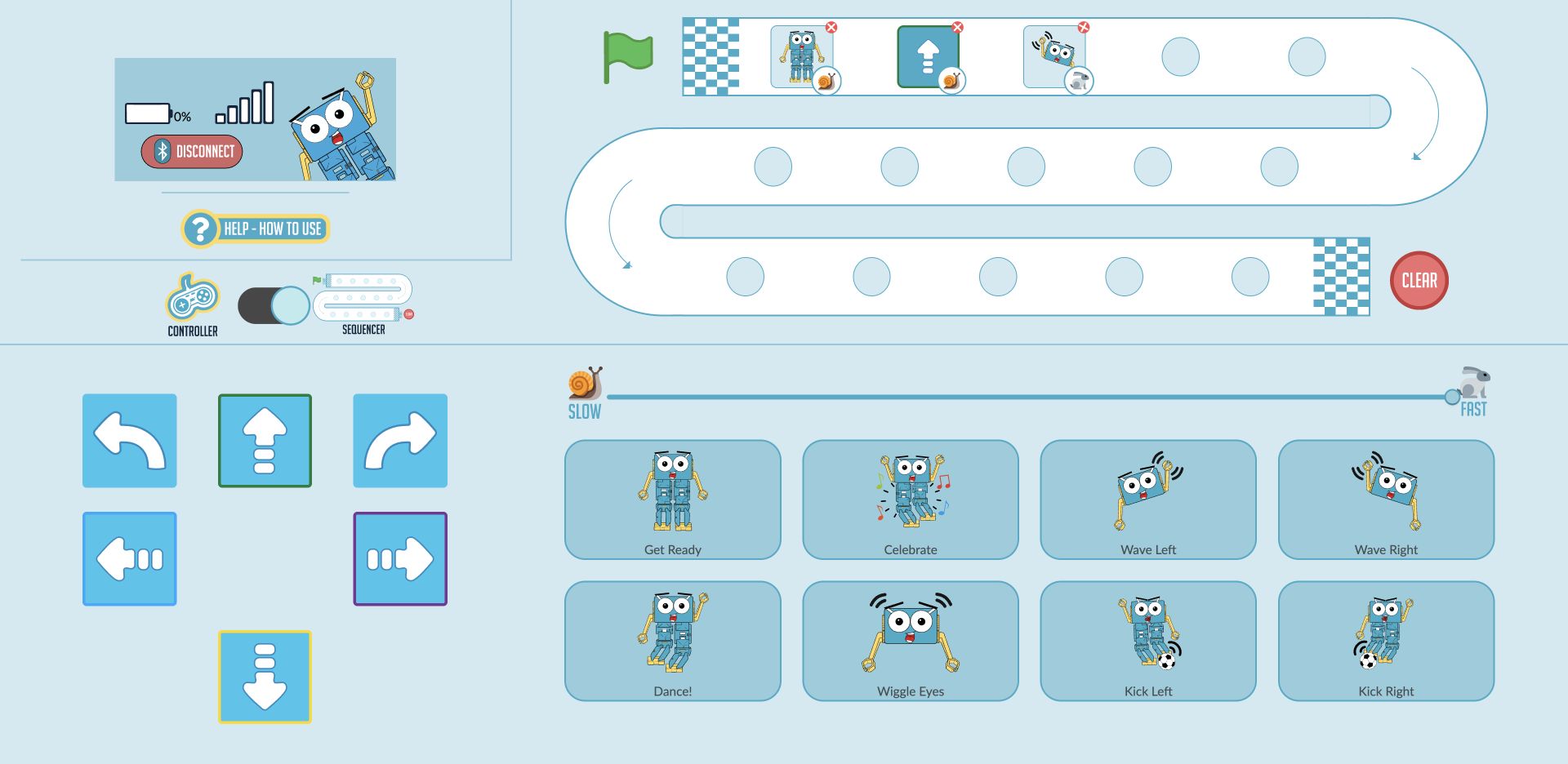
Build a first sequence:
- Select Sequencer with the mode switch before adding any commands.
- Move the speed slider towards Slow.
- Choose Get Ready, then the forward arrow. The two commands appear in the first spaces on the track.
- Move the speed slider towards Fast and choose Wave Right. The new step keeps the faster speed, while the first two retain their slower speed.
- Read the track from its first chequered line, following the arrows: the top row runs left to right, the middle row right to left, and the bottom row left to right.
- Check that Marty has room to move, then choose the green flag to run the sequence.
Run and stop a sequence
Marty performs the commands in order and the track highlights the current step. The sequence finishes after its last command. Choose the green flag again to repeat it.
During playback, the green flag changes to Stop. Choose Stop to halt progress through the sequence. A movement already sent to Marty may finish; Stop does not undo a movement. Choosing the green flag again starts the sequence from the beginning.
Remove steps or clear the track
When the sequence is not running, choose the red cross on a command to remove that step. Later commands move up to fill the space. Choose Clear to empty the track and start again.
The Sequencer holds up to 15 commands. When all spaces are filled, the movement buttons and speed slider become inactive. Remove a step or clear the track to make room for more commands.
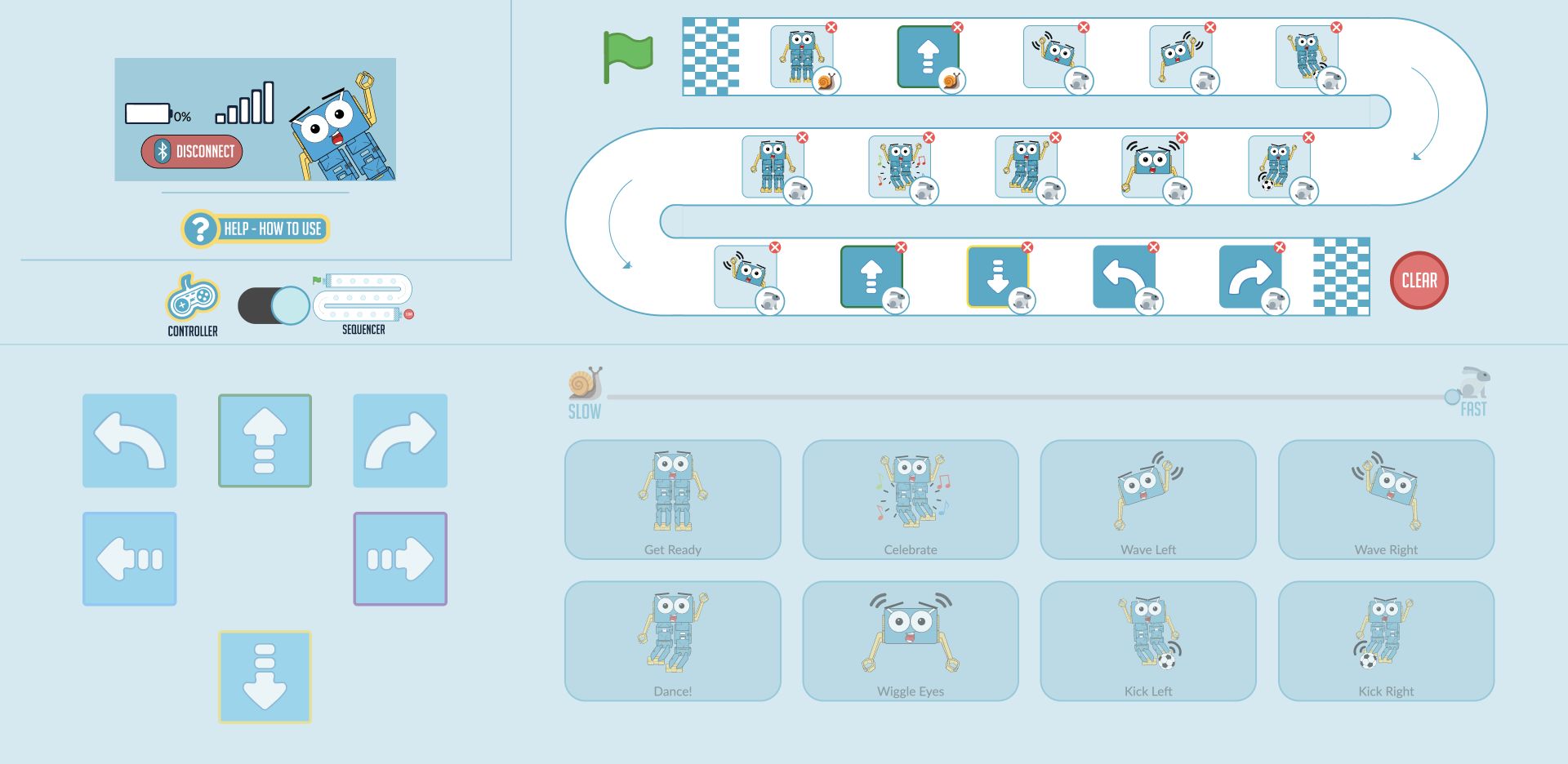
Switching between Controller and Sequencer clears the current sequence. The Sequencer is for temporary routines and has no project save/load controls. For programs you want to save and develop further, try Blocks Jr or Blocks.
For more activities and teaching resources, visit Robotical's Learning Platform.
Screenshots show the current Controller interface and example sequences. Robot status values are examples; your connected Marty's name, battery and signal will differ. The layout can vary on smaller screens.